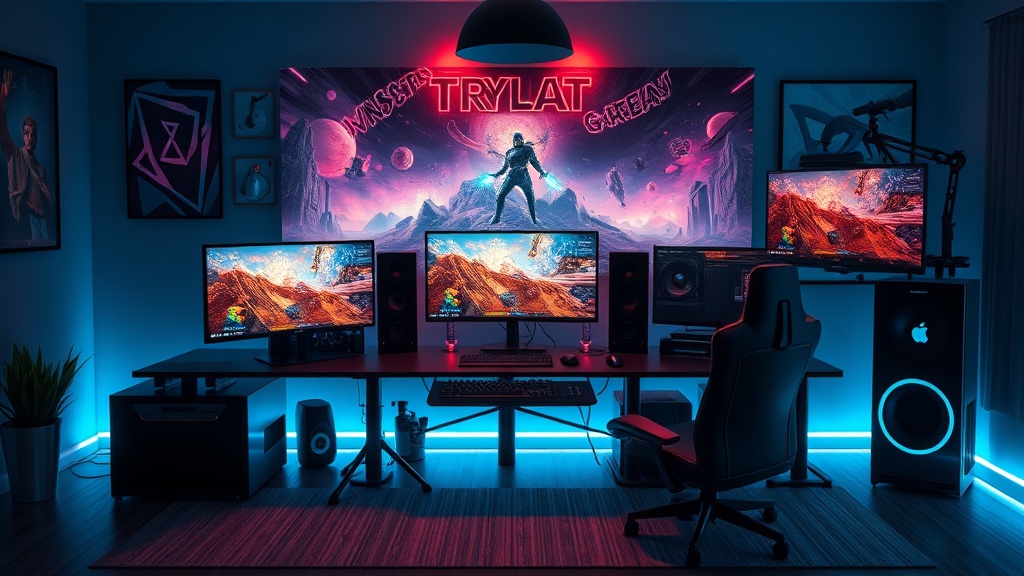
The Ultimate Guide to Building Your Dream Gaming Setup in 2024

The Foundation: Understanding Your Space and Budget
This guide covers everything needed to build a high-performance gaming setup in 2024, from selecting the right monitor and peripherals to optimizing ergonomics and cable management. A well-constructed gaming station isn't just about aesthetics—it's an investment in performance, health, and longevity. Whether you're a competitive player chasing rank improvements or a casual gamer seeking immersion, the components and configurations outlined here will help you make informed decisions that protect both your wallet and your body over thousands of hours of play.
Budget Allocation: Where to Spend and Where to Save
Before purchasing any hardware, establish a realistic budget. For a complete setup in 2024, expect to spend between $1,500 and $4,000 depending on priorities. The general rule: allocate 40% to the PC or console, 25% to the display, 20% to peripherals and audio, and 15% to the desk and chair.
The monitor demands serious attention. A 27-inch ASUS ROG Swift PG27AQDM ($899) offers 1440p resolution at 240Hz with OLED technology—ideal for competitive titles like Valorant or Counter-Strike 2. For single-player experiences, the LG 32GS95UE ($1,399) provides 4K at 240Hz with Dual-Mode switching to 1080p at 480Hz for competitive scenarios. Both displays feature 0.03ms response times, eliminating ghosting in fast-paced shooters.
Budget-conscious builders should consider the KTC H27T22 at $199— a 27-inch 1440p 165Hz IPS panel with 99% sRGB coverage. It lacks HDR brilliance but delivers smooth gameplay without breaking the bank. Pair it with the VIVO Single Monitor Arm ($34.99) to reclaim desk space and achieve proper ergonomic positioning.
The Core: PC and Console Selection
PC Builds for Different Performance Targets
For 1080p high-refresh gaming at 144Hz to 240Hz, an AMD Ryzen 5 7600X ($229) paired with an AMD Radeon RX 7800 XT ($499) handles Call of Duty: Modern Warfare III at 180+ FPS on competitive settings. This combination draws approximately 450W under load, requiring a 650W 80 Plus Gold PSU like the Corsair RM650x ($119).
4K gaming demands more horsepower. The Intel Core i7-14700K ($409) with an NVIDIA RTX 4080 Super ($999) pushes 100-120 FPS in Starfield and Cyberpunk 2077 with DLSS 3.5 enabled. This configuration needs robust cooling—the Arctic Liquid Freezer II 360 ($109) maintains CPU temperatures below 75°C during extended sessions.
Console gamers aren't left behind. The PlayStation 5 ($499) and Xbox Series X ($499) both support 120Hz output at 1440p or 4K. The PS5's DualSense Edge controller ($199) offers customizable back paddles and adjustable trigger stops—essential for Fortnite or Apex Legends where rapid building and weapon swapping determine outcomes.
Storage Considerations
Modern games consume massive space. Call of Duty: Modern Warfare III requires 235GB. Final Fantasy XVI on PC demands 170GB. A 1TB NVMe SSD like the Samsung 990 Pro ($89 for 1TB) provides 7,450 MB/s read speeds, reducing load times in open-world titles. Budget builders can opt for the WD Black SN770 ($69 for 1TB) at 5,150 MB/s—still dramatically faster than SATA SSDs or hard drives.
Peripherals: Precision and Comfort
Mice and Mousepads
Mouse selection depends on grip style and game genre. The Razer DeathAdder V3 Pro ($159) weighs 63 grams and features a 30,000 DPI Focus Pro 30K optical sensor. Its ergonomic shape suits palm grippers playing Counter-Strike 2 or Rainbow Six Siege for 4-6 hour sessions. Claw and fingertip users should examine the Logitech G Pro X Superlight 2 ($159) at 60 grams with the new LIGHTFORCE hybrid switches rated for 25 million clicks.
Small-handed gamers often overlooked by manufacturers have excellent options in 2024. The Pulsar X2 Mini ($94.95) measures 116mm x 62mm x 38mm and weighs 52 grams. The Razer Viper V3 Pro ($159) accommodates various grip styles with its ambidextrous 119mm length.
Mousepads impact tracking consistency. The Artisan FX Zero Soft ($49) remains the competitive standard with its unique foam structure that prevents humidity-induced slowdowns. For durability, the SteelSeries QcK Heavy ($19.99) offers 6mm thickness that smooths uneven desk surfaces and maintains glide for 2-3 years with proper cleaning.
Mechanical Keyboards
Keyboard choice affects both gaming performance and typing health. The Wooting 60HE ($174.99) revolutionized competitive play with Rapid Trigger technology, allowing actuation point adjustments in 0.1mm increments. This proves game-changing in Valorant where counter-strafing precision determines duel outcomes.
For traditional mechanical switches, the Keychron Q1 Pro ($199) offers a gasket-mounted aluminum chassis with hot-swappable sockets. Install Gateron Oil King switches ($0.60 each) for a deep, muted sound profile and 55g actuation force that reduces finger fatigue during 8-hour streams.
Ergonomics matter. Tenkeyless (TKL) and 75% layouts like the GMMK Pro ($169) bring the mouse hand closer to the body's centerline, reducing shoulder abduction. Studies from Cornell University indicate keeping elbows within 20 degrees of the torso minimizes shoulder strain during extended computer use.
Audio: Headsets and Alternatives
Sound positioning provides competitive advantages. The Sennheiser PC38X ($169) uses open-back drivers with angled 40mm neodymium magnets, creating a soundstage that accurately places footsteps in Escape from Tarkov or Hunt: Showdown. The 28Hz-22,000Hz frequency response reveals audio cues cheaper headsets mask.
For closed-back isolation, the HyperX Cloud Alpha Wireless ($199) delivers 300 hours of battery life—nearly 10x competitors. Its dual-chamber drivers separate bass from mids and treble, preventing the muddy audio that causes missed callouts.
Standalone microphone setups offer superior voice quality. The Audio-Technica AT2020USB+ ($169) captures 20Hz-20,000Hz with a cardioid pattern that rejects keyboard noise. Pair it with the Rode PSA1 boom arm ($99) and a pair of Philips SHP9500 headphones ($74) for a $342 setup that outperforms any gaming headset under $400.
Ergonomics: Protecting Your Body
Gaming marathons extract physical tolls. The average gamer spends 8.5 hours weekly playing—competitive players often triple that figure. Without proper ergonomics, this leads to carpal tunnel syndrome, forward head posture, and chronic back pain.
Chair Selection
Racing-style gaming chairs prioritize aesthetics over biomechanics. The Secretlab Titan Evo 2022 ($519) improves upon this with adjustable 4D armrests and a magnetic memory foam headrest, but office chairs often provide better value.
The Herman Miller Aeron ($1,395) remains the gold standard with its Pellicle suspension that distributes weight evenly and eliminates pressure points. The adjustable PostureFit SL supports the sacrum while maintaining the spine's natural S-curve. For budget-conscious buyers, the Steelcase Series 1 ($492) offers comparable adjustability at one-third the price.
Critical measurements: feet flat on the floor, knees at 90-100 degrees, monitor top at or slightly below eye level, and elbows at 90 degrees when mousing. The keyboard should sit 1-2 inches above thigh level to maintain neutral wrist positioning.
Desk Configuration
Standing desks combat the cardiovascular risks of prolonged sitting—studies link 8+ daily sitting hours to 20% increased mortality risk. The Fully Jarvis ($599) provides 25.5 inches of height adjustment (24.5" to 50") with a 350-pound capacity. Program three heights: seated gaming, seated work, and standing.
Surface dimensions matter. A 60-inch width accommodates dual monitors with room for peripherals. Depth should exceed 30 inches to position monitors at arm's length (20-26 inches from eyes). The FlexiSpot E7 ($399.99) offers these dimensions with a 15-year warranty on its dual-motor frame.
Cable Management and Environment
Visual clutter increases cognitive load. Route cables through desk grommets and secure them with Velcro ties or adhesive cable trays. The IKEA SIGNUM ($14.99) mounts beneath desks and holds power strips plus excess cabling. For standing desks, the Humanoidlection Cable Spine ($49) accommodates vertical movement without tangles.
Lighting affects eye strain and circadian rhythms. BenQ ScreenBar Halo ($179) mounts on monitors and projects asymmetric light that illuminates desks without screen glare. Its 500 lux output at 45cm meets the German TÜV Rheinland standard for eye comfort. Combine with bias lighting—LED strips behind monitors set to 6500K reduces perceived brightness and improves contrast perception.
Temperature management keeps components throttling. The Noctua NF-A12x25 PWM ($32.99 each) moves 102.1 cubic meters of air per hour at 22.6 dB(A)—quieter than a whisper. Aim for positive case pressure (more intake than exhaust) to reduce dust accumulation.
"The best setup is the one that keeps you healthy enough to play tomorrow. Performance means nothing if you're in pain." — Anonymous Esports Physician
Putting It All Together
A dream gaming setup balances performance, comfort, and sustainability. Start with the monitor and chair—these elements most directly impact performance and health. Build or buy a PC that matches your display's refresh rate to avoid bottlenecking. Select peripherals based on physical measurements and game genres rather than RGB lighting or brand loyalty.
Most importantly, schedule breaks. The 20-20-20 rule (every 20 minutes, look at something 20 feet away for 20 seconds) reduces eye strain. Stretch wrists, neck, and shoulders between matches. Gaming rewards dedication, but longevity requires wisdom. Build a setup that serves you well beyond 2024.